
AWS AppSync
Overview
Lumigo allows you to monitor your AppSync APIs, detect errors, produce insights and debug information.
Enable AppSync Monitoring
- Open your AWS console and go to AppSync.
- Choose your AppSync APIs you want to monitor and click Settings.
- Click Enable Logs toggle.
- Include verbose content.
- Choose the field resolver log level.
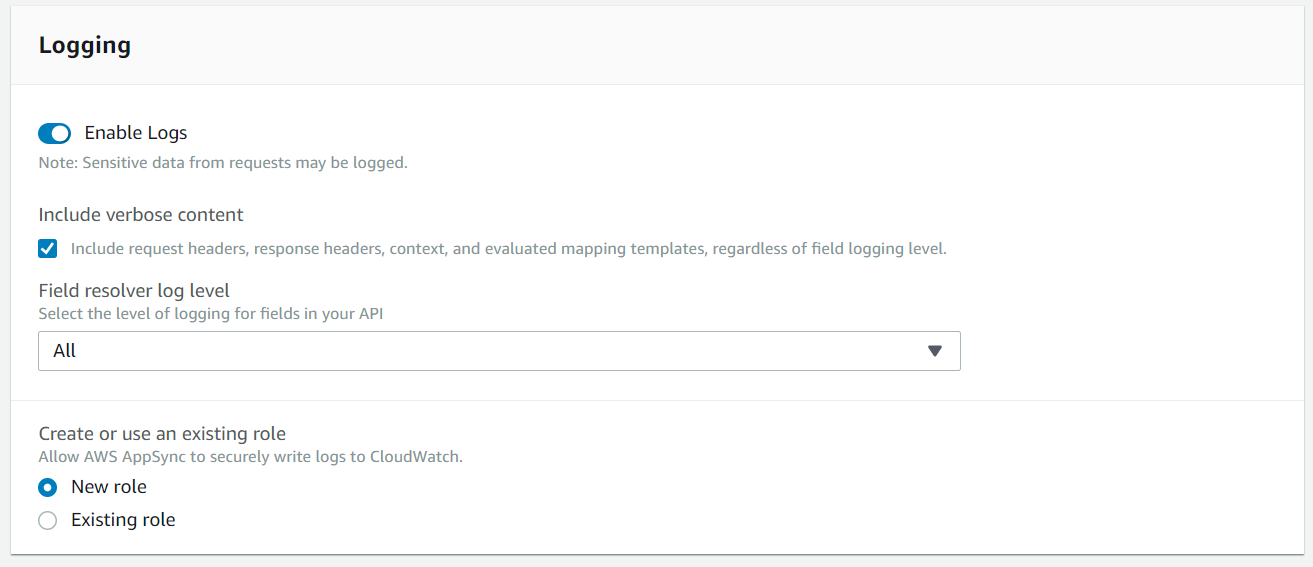
Field resolver log levelNONE: No field-level logs are captured.
Marked as Basic on Lumigo's AppSync page.
ERROR: Logs the following information only for the fields that are in error:
- The error section in the server response.
- Field-level errors
The generated request/response functions that got resolved for error fields.
Marked as Partial on Lumigo's AppSync pageALL: The following information is logged for all fields in the query:
Field-level tracing information.
The generated request/response functions that got resolved for each field.
Marked as Full on Lumigo's AppSync page.To get the most out of AppSync monitoring, choose ERROR or ALL.
Updated about 1 year ago
Did this page help you?